Tag Archives: computer programming
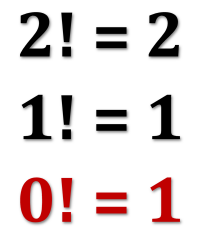 Recently, I learned an interesting new math trick involving what are known as dual numbers. These are compound numbers similar in form to complex numbers but with a different kind of “magic” element enabling their behavior.
What makes them interesting to people like me is the surprising way they provide a fast and easy technique for software to generate the derivative of a given function.
As an unrelated bonus, a simple explanation of why zero-factorial is equal to one rather than zero (which might seem more intuitive).
Continue reading
Leave a comment | tags: computer programming, derivatives, dual numbers | posted in Computers, Math
 Back in 2014 I decided that a blog that almost no one reads wasn’t good enough, so I created a blog that no one reads, my computer programming blog, The Hard-Core Coder. (I was afraid the term “hard-core” would attract all sorts of the wrong attention, but apparently those fears were for naught. No one has ever even noticed, let alone commented. Yay?)
In the seven years since, I’ve only published 83 posts, so the lack of traffic or followers isn’t too surprising. (Lately I’ve been trying to devote more time to it.) There is also that the topic matter is usually fairly arcane.
But not always. For instance, today’s post about Unicode.
Continue reading
24 Comments | tags: alphabet, binary, computer programming, letters, Unicode | posted in Computers
 Computer programmers are exceptional thinkers. By which I don’t necessary mean they are “exceptional” in the sense of “outstanding” (although no doubt some are). I mean they are trained to think about exceptions (to the rule), about what might happen.
Computer programmers, in general, think about all the possible paths a system could take. When creating email software, they have to think about all the possible ways a user might use the software. There are the obvious actions the user is supposed to perform to read or write email. But there are also “What happens if I click this?” moments to consider.
It’s not about just of the “correct” ways but also about the “incorrect” ways!
Continue reading
5 Comments | tags: Computer programmers, computer programming, critical thinking, engineers, exception to the rule, negative thinking | posted in Brain Bubble
 I don’t know if it’s having been in the saddle so long, having all this retirement time, or the magic of Python (perhaps all three), but I’ve made major advances in personal projects that have been on my drawing board for a very long time. One of them, in fact, goes back to my earliest days of programming in late 70s!
It’s certainly true that 35 years of writing computer software teaches you a few tricks. At the very least, you learn all sorts of things not to do! On some level, the computer language doesn’t matter, but a highly expressive language makes some kinds of development not just easier, but actually fun!
And Python! I haven’t laughed with delight over a computer language since Lisp!
Continue reading
3 Comments | tags: chess, chess move, chess move parser, computer programming, graph theory, maze generator, mazes, programming, Python | posted in Computers, Sideband
 November shouldn’t pass with just the one post. I intended a post last Science Fiction Saturday to rave about the new Doctor Who episode (celebrating 50 years of Doctor Who), but the day slipped to Sunday before I got the writing motor started. I’ll rave about it now: it was really, really good! A wonderful, delightful milestone marker and, as always, built on a damn good story.
I’ve not been idle lately! Dedicated post-retirement loafing finally shook the work dust off my shoes, and I’ve gotten back into personal project work. Seriously into it. In the 16-hour sessions, sleep and eating are unwelcome distractions, not knowing what time of day (let alone what day of the week) it is sense of seriously.
And I read some really good vampire novels!
Continue reading
11 Comments | tags: Amy Heckerling, Berserker series, Bram Stoker, Chelsea Yarbro, computer generated images, computer programming, Count Dracula, Doctor Who, Fred Saberhagen, Johnny Dangerously, POV-Ray, Python, science fiction, vampires | posted in Books, Computers, Movies, Sci-Fi Saturday, TV
 I close the first round of CS101 articles with some of my very favorite CS jokes. Sure, they’re esoteric, but they’re also really funny. Thing is, you may have to trust me on that.
Binary
I have a sign in my cube:
There are 10 types of people…
Those who can count in binary,
and those who can’t!
It garners two reactions. Some people just walk away puzzled. Some people look puzzled for just a moment and then they crack up.
Continue reading
3 Comments | tags: binary, COBOL, computer programming, humor, jokes, Unix | posted in Computers, Sideband
 If nothing else (and I think there is plenty of else), I can look back on all those years of writing code and pick out the main themes and principles, the things that seemed to matter most.
That’s what this CS101 series is about: things I think matter most when it comes to designing software.
Lately I’ve been looking into fours, doing things in fours. With that in mind, here’s Four Primary Principles for Programmer:
Continue reading
Leave a comment | tags: computer programming, programming, software, software design, writing software | posted in Computers
 Here’s a simple tip! I can’t begin to count how many potential code bugs this has eliminated. It takes some getting used to but once you make it automatic it’s a real help in keeping code and your thinking correct.
The tip is this: when you write relational expressions, always use less-than, never use greater-than.
Tip: Always write (B < A), not (A > B).
Continue reading
Leave a comment | tags: computer programming, software, software design, writing software | posted in Computers
 Clarity is the #1 priority when writing code. Clarity trumps everything else; it’s even more important than the code being correct! One of the biggest wins a serious programmer can offer is writing clear, readable code.
Source code is for the human reader; it’s not written like that for the computer. If it were up to the computer, humans would use the same ones and zeros it does. It would be much more efficient that way.
But we (inefficient) humans need ways to write and talk about computer programs.
Continue reading
Leave a comment | tags: clarity, computer programming, programming, software, writing software | posted in Computers
 It’s been said that programming is an exercise in managing complexity, and while that’s true, it’s only part of the picture. (Still, it’s a pretty big part!) More to the point, managing complexity applies to much more than software design. A defining characteristic of modern life is its complexity, so learning to manage it might be a Pretty Good Idea!
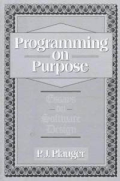
Thinking about a friend struggling with the complexity of life lead to remembering of one of P.J. Plauger‘s articles about problem modeling from his book, Programming On Purpose. (The book is a collection of his essays from the long-defunct, but most excellent, Computer Language magazine.)
Thinking about Plauger’s ideas again lead to thinking they might be worth sharing. Whether fresh or review, these ideas capture six key basic analytical techniques nicely. If you’ve never really thought about them before, you may find the ideas useful.
Continue reading
Leave a comment | tags: bottom-up, computer programming, easy-to-hard, programming, top-down | posted in Basics, Computers, Philosophy




 Logos con carne