 A few posts ago I wrote that for “two weeks I’ve indulged in intense 12+ hour days on a self-education project in Python and its Tk module.” The end result of the binge is seven new apps (so far; more to come) and a good starting grasp of how to make some fairly decent windowing apps in Microsoft Windows using out-of-the-box Python.
More concretely, my “tk” project folder has 14 Python files with over 9,000 lines of code (367,000+ characters). That’s what remains. I didn’t save the many false starts, tests, and trials. Suffice to say I probably wrote close to twice as much code.
This post is “Dear Diary” entry for documenting the progress, the fun, and the frustration. It may not be terribly interesting for anyone else, but I learned a lot and (ultimately) really enjoyed the experience. And it’s nice to find out that this ancient dog can still learn new tricks.
I’m no stranger to windowing apps though it has been many years since I did that kind of programming.
Long ago (40 some years ago), I learned to program in X Windows on Unix. That was an eye-opener. As I recall, it took over a page-and-a-half of C code just to open a basic “Hello, World!” window. Doing anything interesting or useful required many more pages of code.
X Windows is superpowered but also super complicated. The amount of effort (and knowledge) required of the programmer is considerable. There was an entire shelf of manuals for it. Over the years, various toolkits rode on top of X Windows and made it easier, but in the early days it was a bit ferocious.
And at this point for me, utterly irrelevant. Unless I someday get so fed up with Windows that I switch to some Unix variant. Which is dubious at this point. I have too much MS Windows-based stuff. I’ve been in the MS-DOS/Windows world from the beginning.
The next was probably MS Visual BASIC, which I started using around version 3 (I may have even used version 2, but it’s too long ago to remember — I definitely saw the product evolve and mature over time).
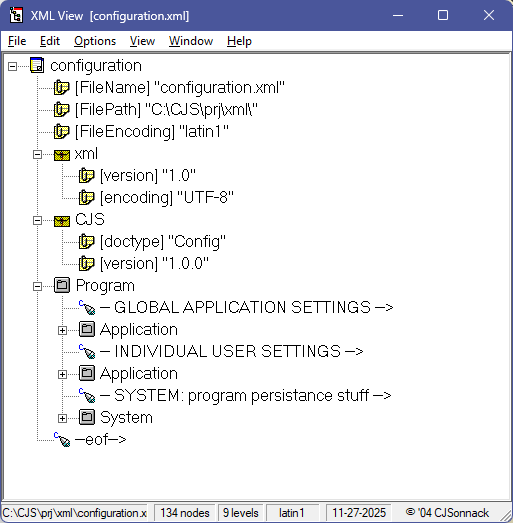
Above is a Visual BASIC XML viewer I wrote back in 2004. It’s one of the few VB apps I wrote that still works. Most of them don’t — missing DLLs or OCX files. I could probably make them work by downloading them, but I don’t want to clutter my system with obsolete files.
And while I do miss — badly in a few cases — apps I created as important and useful tools, my work these days is different enough that I can get by okay without them. Except for (increasingly) rare occasions when something I’m doing would in fact benefit from them. But in this case, the XML fad has passed, and I haven’t needed an XML viewer in some time.
At least not with any frequency. In the rare cases where I do work with XML, I have a powerful tool I talked work into buying for me (price: $1000). I have the install key, so I’ve been able to install it on my machines since. But I think I may have used it only a few times since I retired in 2013.
One of those is the app shown in the lede — Tk Exec (for execute or possibly executive). It lets me configure up to ten commands (linked to F1 through F10) that I can activate with a single mouse click — things I do dozens or hundreds of times a day when coding. And Windows 11 has made the need for a work accelerator a bit more urgent with the new right-click double-menu.
The damn thing effectively doubles the number of mouse-clicks it takes to accomplish routine oft-repeated tasks. Like opening a file in my text editor. Used to be right click, select “Edit in GVim”, and done. Now it’s right click, move down to the “Show more options” entry and click that, then select “Edit in GVim” from a menu that is often overloaded with stuff I don’t care at all about and will never use.
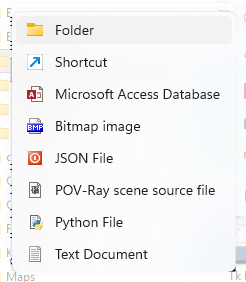 [I recently cleaned up the right-click new-file business so I can (A) make new files of interest to me and (B) not be bothered by a dozen entries that mean nothing to me (all those MS Office files, for instance).
Yet even so, I see that the MS Access one slipped through. I need to take another dive in the Registry to find and remove that one.
I should get rid of that Bitmap image one, too. I never make a blank BMP file. (Does anyone?) I hardly ever deal with BMP images anymore. (Does anyone?) I added the JSON, POV-Ray, and Python entries because I do create new files of those file types.]
Anyway, Tk Exec is a rewrite of an app I wrote in VB way back when. I still have some work to do on the app. It’s useable now but I need to create a configuration editor. Currently, the only way to customize the buttons is by manually editing the JSON file. It needs to be a lot easier — I need to be able to reconfigure it on the fly. The app has multiple configurations in the JSON file, so it’s easy to switch among them:
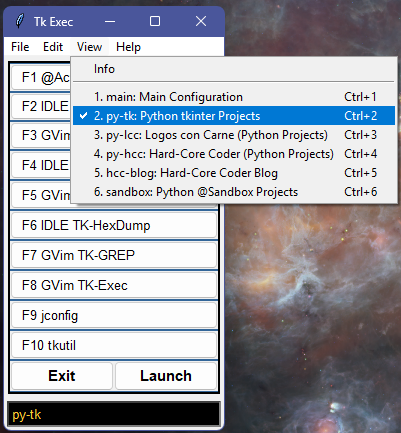
But I need to be able to reconfigure within the app. As you might imagine, the command set I use most frequently often changes rapidly as I complete some tasks and prepare for new ones.
What’s a little odd, and this may change once I complete the work on it, is that even though it’s useable now, I find myself not using it. Perhaps just “not yet” but it feels a bit as if, lacking the app for many years, I’ve found other ways of automating the frequent tasks.
I thought I’d have a hard time filling up this post — there didn’t seem that much to say — but I’m already halfway to my word count ceiling with six more apps to mention.
On the other hand, Exec was a key tool for me for years and one I’d missed. Hopefully, once I finish the new version, I’ll find it as useful as I once did.
Another one I’ve missed is a good version of GREP (yes, I know it’s lowercase in the Unix world, but it supposedly stands for Global/Regular Expression/Print, and I just like it better in caps.
GREP (or grep) is an old Unix utility that scans through text files looking for a pattern match. Most of the world may have moved beyond mere text files, but they are a programmer’s bread and butter (and meat and potatoes). I use some version of text file scanning on a regular basis. Maybe not exactly daily, but awfully close.
It’s such an important utility that at one point I had a shareware product, WinGrep, that was a good fit. That was decades ago, though, and that product lacked certain features I wanted. I wrote a web-based version that has sufficed for many years, but it, too, lacks a few features I want. Features that I found impossible to implement (easily) in a webserver CGI app.
So, I finally wrote my own version that does everything I want:
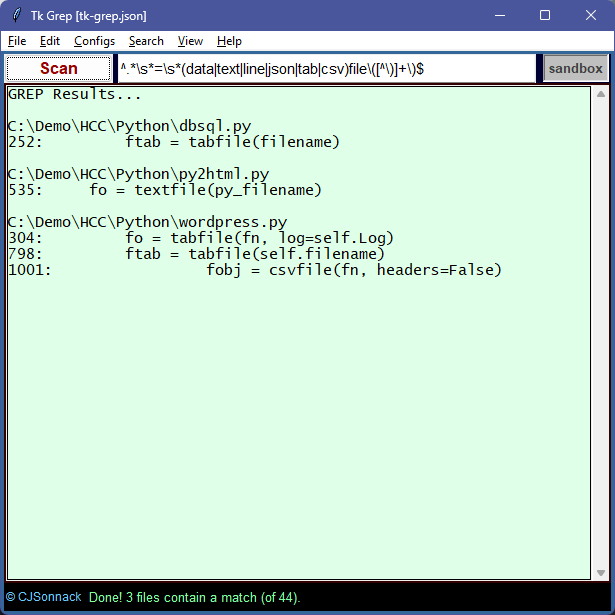
The app takes a regular expression (textbox center top) and scans files that match a given name pattern for matches to the RE. It can recurse subdirectories up to a given level (or all).
Critically — the feature I’ve longed for all these years — is that by double-clicking on the filename, it opens into my text editor. There is also a feature that opens my text editor on all the files that had a matching pattern and sets up my editor to search for that pattern in the file.
Which … was a minor pain because my editor (gvim) uses regular expressions slightly differently. Note the regular expression I used in the example above:
^.*\s*=\s*(data|text|line|json|tab|csv)file\([^\)]+\)$
Which translates as: From the start of the line (^), anything (.*), then zero to any number of spaces (\s*), then an equals sign, then zero or more spaces (\s* again), then either “data”, “text”, “line”, “json”, “tab”, or “csv” followed by “file”, followed by an open parenthesis, followed by one or more (+) not-close parenthesis ([^\)]), and finally a close parenthesis followed by the end of the line ($).
Regular expressions are powerful (see Regular Expressions on my programming blog). Yet it has been said (with some truth) that if you solve a problem with a regular expression … now you have two problems. They are, indeed, a pain to design, test, and maintain. Especially the latter. (But whoo boy, what power!)
Meanwhile, my editor uses almost identical syntax but with variations:
^.*\s*=\s*\(data\|text\|line\|json\|tab\|csv\)file([^)]\+)$
Mostly to do with what needs a backslash (\) to “escape” it. In an RE, as you see, many characters have special meaning. A dot means “any character” and parenthesis are used to delimit groups. My editor reverses a number of those. The “+” (meaning ‘one or more’) is “\+” in my editor, and the grouping parenthesis must also be escaped.
I wasn’t sure I could reliably pull off translating the RE from the Tk GREP app to my editor, but that turned out to be one of the tricks that was easy to accomplish (unlike a few others I could mention).
Anyway, I’m very happy with Tk Grep — it might be the biggest win and most productive app to come from my binge. I’ve already used it to make a sweeping change to my codebase.
Another tool I used a lot back in the day was a hex dump utility. These days I don’t have that much need for such a utility, but it’s one of those things that when you do need it, you really do need it. As with GREP, this is another tool I wanted enough to create a webserver version that’s … passible.
But I thought it would be nice to have an app like the VB version I made long ago. This one also turned out nicely, and I’m very happy with it:
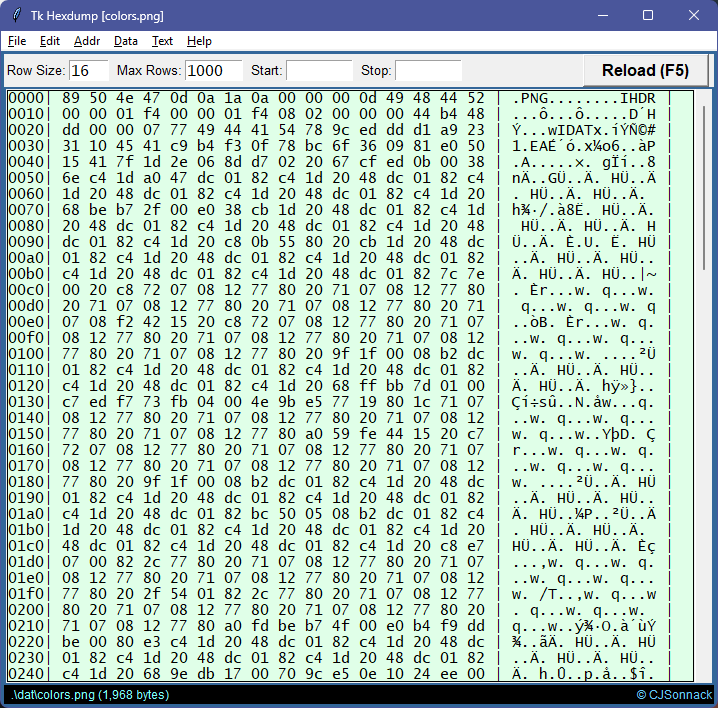
It can look at data in bytes, words (two bytes), or dwords (four bytes). Both address and data can be displayed in hex, decimal, or octal. Address and data display widths are configurable; it can limit how many rows it displays, and you can set the start and stop addresses if desired.
It pretty much does everything I need. On those rare occasions I actually need to look inside a binary file.
Eventually (the next round of binge coding), I’ll add a capability I’ve dreamed of for a long time: using configuration files to display binary files in a structured way. I already have the code around somewhere.
(Writing this reminded me of the first Simple Python Tricks post I wrote on my programming blog. That one was all about writing a hex dump utility step by step.)
In the early days of the interweb, I designed a graphic clock:

But serving a clock over the web offends my sense of parsimony. I’ve long wanted graphic windows capability to reimplement the clock on a local app. Next coding binge I’ll make it look better (if I can) — this image generation code I wrote back in the 1990s.
Starting from the inside, the orange “wheel” is seconds, the green one is minutes, and the brown one is hours. At 11:59:59, all three are full discs. Then, at 12:00:00, they vanish to start growing again.
The “hour” circles — 11 of 12 in red — are the months of the year. We’re in month 11, obviously.
Finally, along the outside are the days of the month (up to 31). As the clock shows, we’re nearly out of year and nearly out of month.
It’s not that I leave the clock open all the time (or to be honest, ever) but figuring out how to implement it was useful and opens the door for some more interesting visual apps. I’m thinking I might implement the colorful game Mastermind, for instance. And it is fun at long last seeing it implemented as it should be.
In the last Friday Notes, I talked a bit about this one:
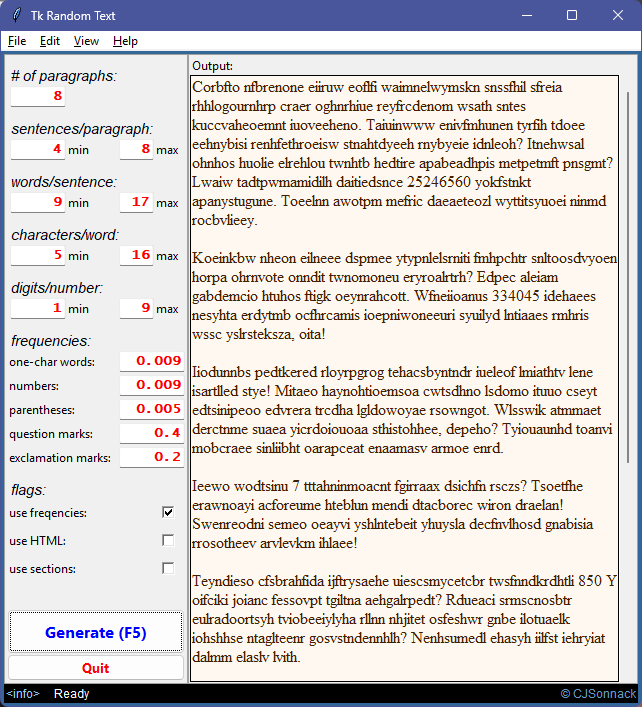
Wrapped a windowing app around my random text generator. The app allows me to play with the various inputs to the generator. As you can see, it allows specification of the minimum and maximums (sentences per paragraph, words per sentence, and so on). And to control the frequencies of things like numbers and punctuation.
It’s a toy — one that grows old fairly quickly — but it’s fun to play with sometimes when I need to take a break and clear my mind.
Long-time readers with good memories may remember that I use POV-Ray to create 3D ray-traced images, usually for blog posts but also for fun and creative expression. One thing about POV-Ray is that, if you want to work productively, each project requires setting up certain configuration files.
For years I did that manually. It’s not horrible, especially with copy’n’paste (though be sure to make all the changes necessary). Many years ago, I wrote some crude Python code to automate it. So crude that I usually had to relearn what the app was doing each time. Some years ago, I rewrote it to make it a little clearer, but it was still something of a PITA to use.
So, I wrote a windowing app for it:
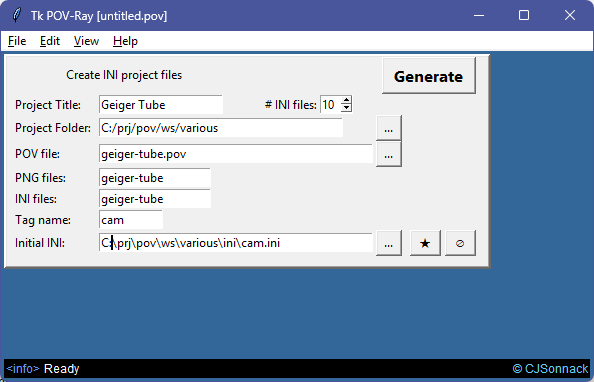
Nothing very special but it lets me enter the required fields in clearly marked textboxes and then does all the rest. Including checking for existing files and asking if I really want to overwrite them. (Details, details, details. They are what makes an app useful and appreciated.)
The way I designed it, it looks a bit like an MDI app, but it’s not. I just put the form window inside the main window. I was thinking I might add some other capabilities to the app but haven’t decided which or what. This alone makes working in POV-Ray easier and might be enough.
Lastly, a work-in-progress yet ironically one of the first apps I started on. I realized it requires some serious background effort, so I shelved it until the next coding binge.
The app is Tk LPLs (LPL = Little Programming Languages), and it’s a shell for various “little” coding languages I like to create:
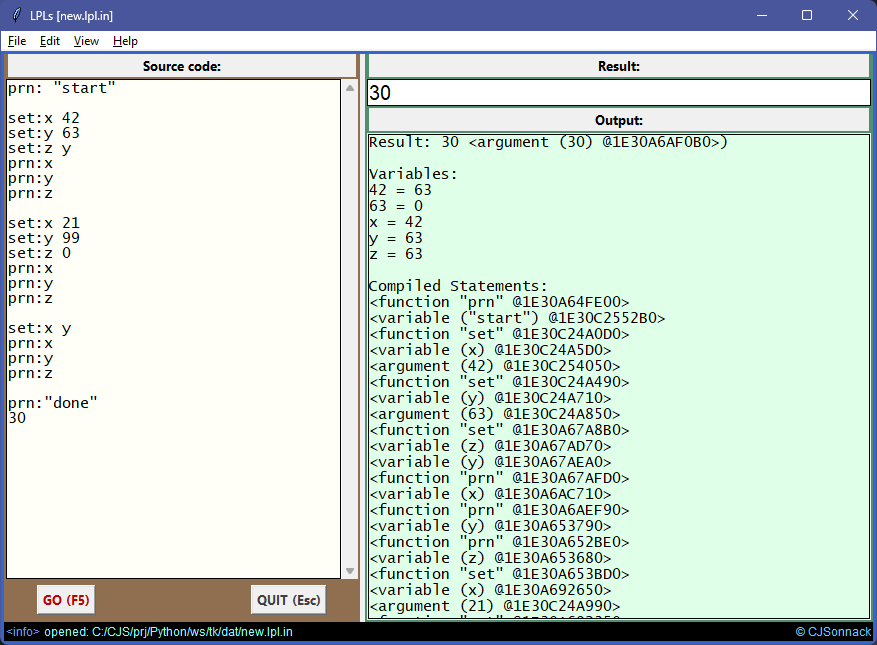
Eventually, I plan for the app to support any and all the ones I create. Right now, it’s implemented to use a prefix language that uses currying to get around arity issues (see Function Currying on my programming blog for more).
§ §
And on that note, I’m way over my word count. If you actually read the whole thing, you’re a trooper! (Or possibly just very bored.)
It’s Thanksgiving Day in the USA today. Definitely mixed feelings on my part. Love the food (mmmm, dressing), but the holiday itself is based on some decidedly shakyass ground. I rather like the idea behind Black Thanksgiving, though. Predates white Thanksgiving by about a century!
As far as giving thanks — beyond the usual things: loving family, very good friends, decent health, comfy retirement — this month I give thanks that my 70-year-old ass is still capable of learning new tricks and putting in some intense project hours. I have much to be thankful for! (And you can maybe see why I needed a week of goofing off to recover.)
Stay yummy, my friends! Go forth and spread beauty and light.
∇







 Logos con carne
November 27th, 2025 at 1:15 pm
Why stick with out-of-the-box Python when there are windowing frameworks that make it easier and better looking? Same reason some cooks work from scratch. There is a certain joy in minimalism — seeing what’s possible with basic tools.
November 28th, 2025 at 7:49 am
You’ve been busy. I remember my first look at a Windows Hello World program. That was a shock. Up to that point, I somehow thought that because GUIs were easier to use, programming would be too, which in retrospect was silly. I had barely even used a GUI when I cracked that first book, so didn’t even know what all the UI names meant.
Although once I became familiar with the basics, I later found myself being annoyed by the way a lot of the other frameworks (like MFC and Borland’s old OWL) got in the way. Although Visual Basic did a good job of abstracting the details away without introducing new ones.
A late Happy Thanksgiving!
November 28th, 2025 at 12:16 pm
I spent several years using C++ to write Windows apps, though I mostly stayed away from the MFC — kind of for the reason you mention: they can get in the way. I tended to use C++ as a much-improved C and wrote for the win32 O/S calls. (That was actually easier for me because by then I’d been coding for MS-DOS for years and was familiar with doing stuff like that.)
But yeah, any app that did anything useful required a lot of pages. Often, the message loop itself, usually a huge switch/case structure, extended to two or more pages.
Compared to that, VB was … well a good comparison was when I learned Java compared to C++. Garbage collection alone made it so much friendlier. Once I got into Java, C++ (let alone C) was largely history. Now it’s Python, and Java is history. The xkcd cartoon is right on the money.
https://xkcd.com/353/
Hope you had a good Thanksgiving, Mike! (I made garlic pasta for which I’m paying a small price today. And I probably reek!)
November 28th, 2025 at 12:26 pm
Funny the mention of Antigravity…
November 28th, 2025 at 2:50 pm
What’s extra funny about the cartoon is that if in Python you type:
It pops open your web browser on that cartoon. (Several Python versions ago it printed the Python approach statement to the screen, but I think the popularity of the cartoon caused them to change it.)
November 28th, 2025 at 2:11 pm
Ah yes, the gigantic switch statement, which usually made the Windows proc several thousand lines long. Good times (not).
Pretty sure if I took up programming again it would be with Python. Everyone I know who does programming outside of their job loves it. Strangely enough, I’ve had a hard time interesting the programmers on my development team at work in it, even when it’s often the best language to use for data analysis.
Garlic pasta sounds damn tasty!
November 28th, 2025 at 2:46 pm
It was. Very! My digestion usually doesn’t like it as much as I do, though.
What do your team members prefer?
November 28th, 2025 at 3:21 pm
They’re big into C#/.Net, which ironically I got their manager hooked on many years ago. They’re also comfortable with Java, but that one’s out of necessity since we have a lot of legacy code in it. And they grudgingly do a little PHP, again because we inherited a few apps in it.
I see that Python now dominates the Tiobe index, which I just checked for the first time in several years. So it might only be a matter of time. Some of our BI analysts like Python, but the manager of that team prefers SAS, so he’s managed to squelch it so far.
November 28th, 2025 at 3:31 pm
Oof dah, C#/.Net … when it came out, I could see it had a huge learning curve and put it off until retirement made it irrelevant. (I’m so glad I’m retired.)
November 28th, 2025 at 12:24 pm
We use Cursor at work, now. Everything written on a Mac, so direct access to unix commands. Cursor uses grep extensively during code analysis and planning. Frankly, AI writes code better than I ever could, is teachable, re. style, comments, verbosity, etc. and every month gets better and better. Python is one of its star languages. Yeah, you’re an old dog, but this thing has tricks worth exploring.
November 28th, 2025 at 3:00 pm
For me that would be too much like having someone else exercise for me. The whole point of doing it is to engage my brain in a hopefully senility-preventing and to me enjoyable activity. It doesn’t matter how good it is. Why would I have someone else perform my hobby activities for me?
I didn’t mention Ai in this post (ran out of room), but in previous ones I have mentioned that I’m indebted to Ai (specifically Microsoft’s Copilot) for answering “how do I” questions. My not-at-all rigorous guess is that it sped things up from two months to two weeks. All the info is out there, obviously, and I could have eventually found it myself, but asking the Ai was much faster.
That said, when the topics moved beyond the basics, it was often wrong. On several occasions it repeatedly fed me different wrong answers. (And it has a long way to go before it writes better code than I do. I assume because it was trained on the same sloppy code I often see in the wild.)
November 28th, 2025 at 3:07 pm
My coding theme has always been, build a thing that accomplishes X. If I could have asked a wizard 30 years ago to provide me an app to do that X, I would have. I hate programming, have for all of those 30+ years. But it paid the bills. I oh so look forward to the next Carrington Event and the end of electricity and of civilization.
November 28th, 2025 at 3:14 pm
😂🤣😂🤣😂
Well, that’s a key difference between us. I took to coding like the proverbial duck to water and have loved it ever since. (The subtitle of my programming blog is “I can’t stop writing code!”) Sometimes I don’t even have an end use so much as something just sounded fun to code.
November 29th, 2025 at 10:57 pm
I love your clock/calendar!
November 30th, 2025 at 1:11 pm
Thank you!