 I thought this year’s Janus posts — one looking back, one looking forward — would be unusually late, but it turns out they’re only one day later than last year’s pair (assuming I post what I’ve just started writing today). Hosting my furry nephew Bentley over New Year’s accounts for the (thoroughly delightful!) delay this year and last.
As usual, this post looks back at the previous year, 2023, and tomorrow’s post (assuming I write it and post it) looks forward to what 2024 might hold in store (guesses and hopes).
And, of course, there are stats and charts.
Bentley hung out with me from December 29th to January 11th. Then we both took a long weekend to recover — it’s a big (and very much loved) change of pace for both of us. Now, it’s Monday and time to get back to what passes for normal around here (and there).
There’s an inescapable weather lotto when it comes to Bentley’s vacations with her less furry Uncle. Actually, that weather lotto exists for her all the time — is it too cold or too hot to enjoy walking outside? Or sensitive soul that she is, too rainy to even consider going out? When you’re a dog with critical business outside, these things are important.

Wandering through the woods (Nov 26). She’s wondering why I stopped (to take this picture). How far out in front she tries to be is an excellent gauge of her energy level. We’re near the beginning of this walk, so she’s taking point. We’ll be side-by-side by the end.
The lotto in our case is just whether the weather will be decent enough for us both to enjoy our vacation together. For instance, February of 2019 had lots of snow and cold. So did last year during this time. There have been sweltering summer suns and bitter winter winds, but this time — thanks to global warming — the weather gods smiled on us. We had temps in the 20s and 30s (a few highs in the 40s) and no snow to speak of (a minor dusting a few times).
Speaking of global warming, 2023 was the warmest year on record (since 1850). By far. And 2024 has a one-in-three chance of being warmer still. We can, I think, at this point drop the euphemism “climate change” which was coined largely to appease and seduce deniers. Since 1850, the ten warmest years have all occurred in the past decade. Put simply, the past decade was the warmest decade in 174 years.
We’re in trouble. It’s gone too far to stop anytime soon. The world is a very large ship, and it takes a long time for it to change course. The change is already manifest in our late winters and altered growing seasons.

Draggin’ and droopin’ after thirteen days on vacation.
But it did result in a nice vacation for Bentley and me during what one would historically expect to be snowy and cold weather. Small silver lining in a big dark cloud.
The cruel irony for BentleyMom was the dropping temps beginning the day after she returned from Florida. The expected big winter storm — just in time for the weekend — didn’t materialize, but we got blasted with northern air — temps dropping below zero — and there has been enough snow that it will likely stick until spring (unless we get a fairly hefty annual January thaw).
In any event, winter finally showed up. Halfway through January. Whereas, in the days of my youth, it was about now that winter started getting a bit old. (I had an uncle who thought February was the worst month of the year.) The holidays were past, school was back in session, and winter was mostly something to endure until spring. (Something that got worse once we were driving.)

The view outside my office window this morning. Compare with the same view this past Christmas Day.
I’ll return to global warming when I look forward tomorrow. (Not that it’s something to look forward to in the usual sense.)
§
According to the timeline on my library app, I read over 190 books in 2023. That doesn’t include a handful in my Kindle app or any physical books (the latter becoming increasingly rare — I’m pretty sold on ebooks).
I started the year with five books by comedian Chelsea Handler. Mostly reminded me that I don’t usually care for books by celebrities, even funny ones. I just don’t care about their lives. [Briefly mentioned these here and here.]
After that I read seven by mystery author P.D. James. I wrote a post in early February when I had just read — and liked — some of her short stories. But as my latter comments on that post reflect, I didn’t take to her novels. I found her characters overburdened by implications and overly self-aware and introspective. I found her novel writing to be overly descriptive and often tedious. She is, perhaps, too much of a writer’s writer for me. Her skill is unmistakable but so is my lack of engagement.
To give her a fair chance, I later read two other earlier novels, and her earlier work was a bit more engaging, but her overall dark and dismal tone just isn’t for me.
I fared considerably better with Ngaio Marsh, whose stories I thoroughly enjoyed. Starting in late February and ending in late April, I inhaled all 33 of her novels (plus a short story collection). [See this post. Which also mentions my issues with P.D. James in more detail.]
In 2023, I also read the 20 or so Ellery Queen novels my library has available online (which seems to be the bulk of them). And I galloped through over 30 Dick Francis novels (something I have yet to post about). I’m trying to decide whether to pursue the novels written by son Felix Francis. Or have I had my fill of thriller mystery stories set against the background of horse racing?
The ones dad Francis did are pretty good: very readable and each one is different. If the son keeps up the same level of writing, definitely maybe.
Rounding out the year, several others [see this post], but special mention to the Matthew Scudder series by Lawrence Block. Liked those a lot. I’d say I’m definitely a fan of Block’s work. I went on to read his Keller the Killer series, and this year I’m exploring some of his other work.
§
Looking back, 2023 was heavier on the mystery/thriller genre and lighter on science fiction stuff than is typical for me. It’s usually the other way around, but last year I was more into exploring mystery authors.
There was some SF, though. I read most of what my library has available by Cory Doctorow. They were fun reads, but I never did post about any of them. Most are near future predictions of upcoming technology — 3D printing plays a big role in most of them. Disneyworld is prominent in at least two of them (Down and Out in the Magic Kingdom and Makers).
I liked the Netflix series The Umbrella Academy and watched all three of the extant seasons last February (the first season came out in 2019). [See this post.] The TV series is an adaptation of a 2007 comic book series. Then I saw that my library had all three volumes of the comic series (online) and read them.
Firstly, I am pretty entirely over comic books and graphic novels. Unless they’re really good and something different. (These did pretty good on the something different axis.) I’m definitely over the standard superhero stories and the usual derivatives (“what if superheroes were assholes?” — it’s been done since 1984). Secondly, I liked the adaptation way more than the comic series, which seemed to struggle with the concept of a coherent narrative.
Other than that, there were some Rudy Rucker books I’d never read (or even knew about). [See this post.]
There were also some Philip K. Dick novels as well as some William Gibson. If I’m honest, as good as they are, I find they can be such effort to read that it mutes my enjoyment. I sometimes feel I’m too stupid to fully appreciate all they pack into their writing.
§
Last year didn’t stand out much on the movie and TV series front. There was a neat low-budget Japanese time travel movie worthy of note. And a series of Vietnamese movies I enjoyed. Other than that, mostly the usual forgettable Hollywood junk food. I watched a lot of older Asian martial arts films to console myself.
Amazon Prime original shows, like the Netflix ones, are sometimes hit and mostly miss. The third season of Upload came out, and I’m still thumbs up on it. [See this 2020 post.] Some new threads along the way keep it mostly fresh. There was also a second season of The Legend of Vox Machina, and it was okay. Still worth watching. [See this 2022 post.]
On the flip side, I didn’t enjoy the second season of Invincible. [See this post.] In part, because I’m so over superheroes, but also because the story seemed to go off the rails. They only released half the second season, and when they release the other half, I may have to write a follow-up post.
I’m even less happy with season two of Reacher. The first season, based on book #1, Killing Floor, was pretty good [see this post], but the adaptation of Bad Luck and Trouble (book #11) is awful, perhaps to the point of earning a spot on the Awful Adaptations list. I am so disappointed. What (the fuck) happened?
Recent television is so bad I found myself watching some older series. I’m working my way through Cheers. I tried a few episodes of Frazier, which I liked when it aired, but I never really liked Frazier or his brother. Some like the show because of the bad things that happen to Frazier and Niles due to their snooty behavior, but that sort of humor never grabbed me. I need to like the main characters, want to hang out with them.
It’s fun that streaming platforms make it easy to check out the first episodes of old TV shows I loved when they were new (and I was much younger). In some cases, with the really good old friends, it’s fun to watch them again. Probably not the same for younger people who don’t have such a gap between the first time they saw a show and now. Some of the shows I loved are 40 years old!
To give this all a TV-style happy ending, 2023 brought the final seasons of both Archer and Letterkenny, two shows that have maintained their quality throughout their runs. Archer, admittedly, was starting to get a bit long in the tooth, but it remained fun to watch to the end. Letterkenny is just plain outstanding (and delightfully different). Sad to see it go, but eleven seasons is a good run.
§
Musically, the Big Event last year was seeing Peter Gabriel in concert [see this post].
I also saw the possibly last live concert by Al Stewart. The set list featured lots of deep cuts and skipped all but the most popular of his well-known tunes. Given his age, and a possible last time out, one might guess he did songs that mattered to him regardless of their general appeal. Or he just did the set he wanted to do and will be back with pop hits next time.

But 2023 for me musically is mainly the Year of the Lady Blues-Rock. Joanna Shaw Taylor, Ana Popović, Samantha Fish, Susan Tedeschi, Beth Hart, and a dash of Grace Potter. All excellent well-established musicians but new to me, and I’m hooked. I’ve realized that blues-rock is my favorite kind of music. I’d never really thought about it before because I just plain love music, but blues-rock rises to the top.
I especially like Taylor and Popović. The former is more traditional blues-rock, the latter somewhat resembles Prince in terms of pop and R&B. Both are outstanding guitarists capable of some serious shredding. Fish also is an accomplished guitar player.
§
I continued (and will continue) trying to learn the mathematics of quantum mechanics. I think I’m almost up to the level of a theoretical physics undergrad. Almost. It’s interesting to look back on where I was a few years ago and see the progress. Not a ton of progress, but progress.
The ultimate goal is writing some visual simulations for my YouTube channel.
Speaking of which, I did an update of my old Unfolding a Cube video:
It was a lot of fun writing the code to animate the unfolding. I meant to post about it in detail but never got around to it. I also finally did another video I’d had in my head a long time:
But the individual images don’t match well enough. Purely my fault, I just used my iPad to snap a picture out my home office window when it occurred to me to do so. To do this right, I’d want to mount a fixed GoPro and take regular frequent images.
Or find (or write?) some software to align the images I have. Seems like something along those lines should exist, but I haven’t looked into it. Doing it by hand… that’s a hard pass.
§ §
I promised (threatened?) charts and stats. But the post is long enough, and I have other irons in the fire today, so (if I publish them at all) I think I’ll put them in a separate post. For now, the key charts are:
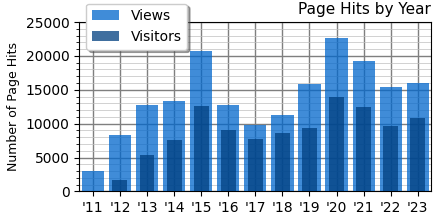
Views and visitors are down from the peak in 2020 with a slight uptick last year. To some extent it matches how often I post:
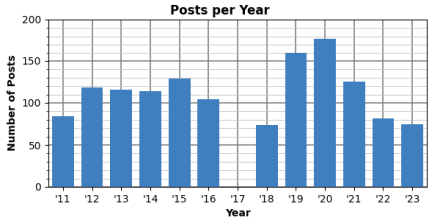
Which has really dropped off in the last two years. Both 2022 and 2023 are below the rate in the “first era” of the blog (from 2011 to 2016). The 75 posts of last year are only one post more than the beginning of the “second era” (2018-present).
On the other hand:
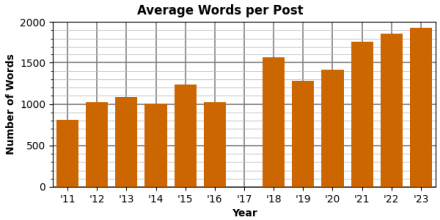
I’m putting more wyrds into posts these days. In part because I’ve decided that 2000 wyrds is a fine ceiling (one that I’m busting in this post). I used to shoot for 1000 wyrds, but I’ve surrendered to my inner motor mouth.
§ §
Stay wordy, my friends! Go forth and spread beauty and light.
∇






 Logos con carne
January 15th, 2024 at 4:07 pm
As we say in Minnesota: Oof dah! A high of 4° today and more of the same tomorrow. Supposed to get up to the 20s early next week — the January Thaw. Then comes the dark cold hell of February.
January 18th, 2024 at 1:57 pm
The picture of Bentley “looking back” was a fully intentional subtle visual gag. That’s my claim, and I’m sticking to it.
January 15th, 2024 at 7:02 pm
Not to mention the personal stuff I got done in 2023: Ate at a bunch of new restaurants, got various vaccinations and a checkup, made a will, designated beneficiaries, arranged my eventual cremation, and opened a CD.
Also got the toilet in the guest bathroom fixed, so it’s usable again. And got my furnace and dryer ducts cleaned. The dryer duct was completely plugged!
I’ve been a lazy bum since I retired, so 2023 was as productive as I’ve been in a decade.
January 16th, 2024 at 4:50 pm
[…] other face of Janus looks forward to the Christmases yet to come. Or words to that effect. The last post looked back at some highlights from 2023; this one looks forward to the hopes, plans, and guesses […]
January 16th, 2024 at 5:06 pm
If you want to send those images to me, I might be able to align your images for you in iMovie. I’d probably get rid of the bars on the sides in doing it because I might have to zoom in.
GoPro does have some cool features for doing time lapse stuff, but I haven’t really gotten into it in a serious way. And I have the older version. I imagine it’s gotten even better by now.
190 books! Wow! I have no idea what I’ve read this year, how sad is that. I did get a few mystery novels from a friend for Christmas (after telling him I didn’t think I’d ever read a mystery novel). Someone in my writing group thought I wrote like a mystery novelist and the friend who sent me the books told me he hopes I go in that direction. So I think I’ll have a crack at it!
January 17th, 2024 at 11:28 am
Do you mean the individual images (PNG files) I used to make the movie? The snaps I took with my iPad? Or do you mean the movie itself (an MP4 file)? I’m confused by what you mean by “bars on the sides”.
Aligning definitely means zooming in and losing some of the image around the edges! When you say you can do it in iMovie, do you mean by hand, or is there something iMovie can do automagically? I have iDevices and iMovie. Is this a feature I can look into? I ask all this because it seems to me that, if done by hand, the effort involved is considerable. There are a lot of images! I considered doing it myself (by hand), but I don’t want to, and I wouldn’t wish it on anyone! But if you know about some automagic that’ll work, let’s talk!
A GoPro would be fun in so many ways!
Heh, yeah. I do a lot of reading. Always have. I’d love to read your mystery novel(s). Crack away!
January 17th, 2024 at 2:02 pm
I meant the individual images, the snaps on your iPad, but I see what you mean about sending those to me. That could take forever. It’s not hard to do yourself on iMovie, but there is no automatic way of doing it that I know of. Even so, image by image cropping wouldn’t take forever either. I’m sure you’ve done things with computers that were far more detailed.
The “bars” I was referring to are on the sides—the black areas that appear when the photos don’t fill up the screen. You can get rid of those simply by zooming in or using the “Crop to Fill” setting on iMovie. (It drives me nuts when people hold their phones vertically instead of horizontally to film things. You see the problem it creates for video editing nearly every time you watch the news and they use amateur phone footage—it’s those huge spaces on the sides of the actual video which are often filled in by a blurred version of the same video to avoid the black bars. Kind of hard to describe, but I think you’ll know what I mean when you see it, next time you watch the news. The reason the video editor can’t simply zoom in on the footage to make it fill the screen is because footage taken with a phone loses quality the more you zoom in. The amount of zooming required for phone footage shot vertically is quite a lot, and doing so makes the images very blurry and pixelated and basically unusable. Anyway.)
Your version of iMovie may be different from mine, so some of what follows might not be exactly where I say, or even called the same thing, but I think you’ll be able to figure it out.
First make sure you have all of your images organized in an iPhoto “album” (or at least organized somewhere, which I’m sure you do).
Go to iMovie, click on “Create New” and “Movie” to start a new iMovie project.
Go up to “iMovie Settings” and in the window that pops up, change “Photo Placement” to “Crop to Fill” (definitely don’t want it set to “Ken Burns” or you’ll get a panning effect across each image, which would be pretty nauseating!) In the same window, change the “Photo Duration” to 1s (one second), or for however long you want each photo to appear. Do the same for “transitions”. If you don’t want to use transitions, that’s fine, but you might as well set the transition duration to something like 1s now, just in case you change your mind. Doing this will save you time later. If there’s a check box for “slow motion”, don’t worry about it. This won’t apply to photos.
Then just import or select-highlight your photos and drop them into your timeline (the space at the bottom) in order. The black bars on the sides should be gone and each photo cropped to fill up the screen.
Then you’ll click on the photo you want to edit to highlight it, then go up to the top right of your screen where there’s an icon that looks roughly like a box. It should be to the right of an icon that looks like a paint palette. Click on that. It’ll say “Style” and give you three options: “Fit”, “Crop to Fill”, and “Ken Burns”. Click “Crop to Fill”.
Now you should have to option to use a mouse to drag the cropping rectangle to where you want to further crop your image. I would start with the pointed tip of the roof (on the right) as my reference point in your images and just drag the cropping tool so that the edge of the cropping tool rectangle touches the roof’s pointed tip. Then click the blue checkbox on the right when you’re done.
Do the same for all your photos, one at a time, until you reach the end. See how that works out for you.
Many of your photos are already pretty close to being aligned, though some (especially at the beginning of your movie) are zoomed in far beyond the pointed tip of the roof. Alas, those images won’t work if you want everything to look more or less aligned using the tip of the roof as your reference point. If you really want to keep them, then the beginning of the movie will just be not as well aligned as the rest. 🙂 Or you could try a different reference point, like maybe that plant at the bottom? Not sure. Things could get wonkier the more you zoom.
It’s hard to tell if you took the photos at different angles and distances. To me it looks like they were taken from the same distance and very close to the same angle, so I think you’ll get pretty good results, though not perfect. (Gotta use a tripod for that.)
Not sure I explained all this well. It would be easier to show you. You can always check out videos on YouTube if you get stuck. What I’m talking about doing is not as hard as I’m making it sound, though. It would take me a few seconds to crop each photo. Hope this helps and I didn’t just waste your time!
January 17th, 2024 at 5:33 pm
Wow, thanks for writing all that! I really appreciate it. I have some background in graphics and photography, so I was able to keep up with everything you said!
Assuming you watched the video on the blog, the black bars are a consequence of the frame WordPress creates for YouTube videos. That frame assumes widescreen content (16:9), and I used 4:3 for the tree videos because that’s the raw format of the images. Both my iPhone and iPad take 4032×3024-pixel photos, and I kept the same format for the prototype movies. If you use your browser to view the video on the YouTube site in default mode, YouTube adjusts to the 4:3 format, so no black bars. Point is, they’re not part of the video itself.
Totally agree about people who shoot video vertically. Drives me crazy, but it’s apparently common on some social platforms. YouTube started pushing “Shorts” lately, which are (AIUI) videos less than one minute long. And they all seem to be vertical format, so I refuse to look at them.
Pixelated?!… You mean “zoom and enhance” isn’t a real thing?
My intent is an HD version, so I only need 1920×1080 pixels out of the 4032×3024-pixel photos. (If I can extract 3840×2160 pixels, which should be possible with all but the most misaligned, I could do a version in 4K HD!) The big point here is that, yeah, there’s plenty of room to crop each image, but — besides being incredibly tedious — requires a pre-analysis to figures out exactly where to crop.
Some of the photos are very poorly aligned. The only saving grace is taking all of them from more-or-less the same place out my window. I didn’t really start thinking in terms of a time-lapse movie until about a year ago, but I’ve been snapping shots of my tree since 2016. (There are 318 of them in my “The Tree” album.) Mostly it was documenting the seasons — I tended to take a picture during big storms or after a big snowfall. It wasn’t until this spring that I began trying to frame the image the same way each day. (At some point early this year I decided on the movie and to take an image each day at the same time. I wasn’t always here at the right time, but most of them from that point are.)
There is also that the images come from my old iPad, my iPhone, and my new iPad, all of which have slightly different cameras. In particular, they have (I’m pretty sure, but haven’t examined it closely) different focal lengths and fields of view. That accounts, I think, for some of the big changes between images. So, no matter how good I crop, the images still won’t match. (I have graphics software that makes the cropping as easy as possible — I’m sure it works much like iMovie does — but cropping over 300 images is daunting. Especially if I end up having to redo them to get them right!)
What I want (and am sure must exist in some form) is software that can be told to lock in on the tree — or perhaps the buildings would be a better reference point — and adjust each picture by shifting its pixels for the closest match. The shift moves the edges, so only the part of the image common to all is available but should still allow a 1920×1080-pixel frame (if not the 4K frame). This probably also requires multiple looks to figure out how to center the shifted images.
FWIW, there is a longer version that includes all the images if you want to see how random some of the early ones are. In some cases, I was more focused on my just-shoveled walk than on the tree. There’s a third one I did first, and all three are prototypes to see where I was starting from.
I should see what iMovie can do for me in terms of stitching the frames together. I wrote some Python software that adds the timestamp and does the blends from image to image. It controls the number of frames (at 25 frames/sec) in the blend and the hold of the still image. I want really short blends, maybe as low as 6 frames, and hold times of 24 frames (could be shorter, I think). Works fine, and is mostly automatic, but maybe it would be simpler on something like iMovie.
January 17th, 2024 at 8:11 pm
Oh man, I had no idea you had so many pictures in there. Yeah, 300 would be a bit much.
It seems like something that aligns the images should be out there already, one would think. I just don’t know what it is. My video editing skills are limited to iMovie which is pretty limited (but I like to think I’ve worked it to the max) 🙂 iMovie is very intuitive, and the couple of things that aren’t intuitive are pretty easy to figure out with a search on YouTube. I first started messing around with it on an iPad, actually, and I didn’t find it too frustrating at the time (though I probably would now).
I wonder if Canva has anything for alignment? I sort of doubt it, but it might be worth a look. Canva’s fun to mess around with. Beyond that, I wouldn’t know. I think you’d have to actually pay for something more professional.
One thing I like about (my old) GoPro is that it has a voice-activated feature as well as a GPS system that allows you to set the time you want it to start capturing (like sunset, for instance). I used it maybe once and it was pretty cool. I’ve heard you can get motion activated features as well if you go to the website, but I haven’t looked. The voice-activated feature has been useful for me. I like it when you don’t want to move the camera even a little bit by touching it. You can do some cool stop motion stuff with that…or in your case, you could set it up on a tripod and take a photo every day for a long time. I know it does that kind of time lapse, even over the course of a long period of time (somehow, not sure how the power works out) but I haven’t tried it or looked into it. With the voice activated feature you do sometimes have to really yell, “GO PRO TAKE A PICTURE!” and anyone nearby will think you’re nuts.
January 18th, 2024 at 9:36 am
Yeah, 300 is a lot. From the spring of 2023 until my blog anniversary (July 4) I was taking one picture per day. That bumped the count noticeably! I quite agree you’ve made the most of iMovie — very good work! Looks like you’re having fun, too, which is the most important thing.
I’m not familiar with Canvas, but I am pretty sure software capable of aligning images like I want isn’t free. I’ve been pondering how I might write some of my own, but it seems a formidable task that probably requires an expert in image processing algorithms.
If I did want to pursue this with a GoPro, I’d mount a bracket on the wall above the window such that the camera would be pointing out the top of the window. That way it would be out of the way for the months/years necessary to capture a time-lapse capturing the seasons and changes to the tree. I currently have (far less than ideal) images from as far back as 2016, so an eight-year project at this point. I’m not sure I’m up for doing it for another X years, but it’s not out of the question. I’m not a fan of voice activated — I don’t like talking to machines — but I think there are also little Bluetooth “clicker” things you can get that tell the camera to take an image. As you say, super helpful for stop motion stuff.
As an aside, there’s a fun effect you might like to try sometime if you or a friend is athletic enough. The subject jumps up and down. Constantly (hence the need for someone athletic). At the top of the jump they extend their arms. The photographer snaps a frame every time the subject is at the top of their jump (with arms extended). The jumper should jump slightly forward of their position each time and thus move around as they jump. When you combine the frames, it looks as if the subject is flying. Their feet are off the ground, their arms are flapping around, it’s a simple special effect. Ideally the camera is on a tripod. It can pan or tilt to follow the jumper but should have as stable a base as possible to keep the background stable. Photographer takes frames often enough that hand-held can work in steady hands, but it’s not ideal. For bonus points, include some slow-moving friends in frame watching the flier pass by.
January 18th, 2024 at 10:24 am
That sounds like a fun special effect! Might have to drink a few extra cups of coffee for that one.
As for the GoPro idea, I think mounting it would be best to avoid accidentally kicking over the tripod. I do recall reading something about doing these long time lapses, and I bet you they have a way to program it to take a photo at a certain time every day or whatever you set it to. It would be a really awesome effect. I’m still amazed by those time lapse videos where the camera moves as well. It’s an effect that has such a dynamic, surreal feel to it. I recall seeing it as b-roll in Breaking Bad or Better Call Saul, can’t remember which one.
January 18th, 2024 at 1:08 pm
Yeah, they’re cool and fairly easy to do. You just need a motorized track for the camera, one that can move very slowly. The opposite of that is the “Matrix” effect where a ton of cameras lined up all take a picture simultaneously. Stitch the frames together to get that effect of zipping around something frozen in time. But you need a ton of cameras.
I just realized that if I did buy a GoPro to do that time lapse project, I’d have to buy a second one. No point in owning a GoPro if you can’t play around with it, and locking one down for years and keeping my hands off it would be too tantalizing.
January 18th, 2024 at 2:04 pm
I think that Matrix effect is incredible. It would be so cool to mess around with that one, but alas.
You could mess around with your GoPro until you get bored with it, then mount it for your project. If it looks like you’re not getting bored, then buy the second one. I actually bought an older one (at the time) after watching some reviews on YouTube showing side-by-side differences. Some reviewers seemed more enthusiastic about the older models and some thought there wasn’t much difference, so I went with the older and less expensive one. I like how clunky and “90’s” my Hero 7 feels—the opposite of anything Apple. Makes me a bit nostalgic. I remember having a hard time dropping it in water, though. I actually googled “Is GoPro really—” and the rest of the question popped up: “waterproof” Apparently other people felt the same way about it. So I went ahead and dropped it in the fountain and oh joy when it worked and continued working. The only thing I’d say I don’t like about it is that it doesn’t do a great job at night or in low light conditions, but then again, you’d need to get really professional stuff for that. (Although my friend says her newer iPhone does well for that.)
January 18th, 2024 at 5:23 pm
Yeah, it’s really cool, but where are ya gonna get 120 cameras?!
That’s a really good idea, thanks! Get a GoPro now and play around with it and get another if I don’t get bored and still want to do the (or a) time lapse project. Definitely the way to go. It inspired me to at least look at what Amazon has. Pretty reasonable, especially if you just buy the camera. The package deals don’t add all that much to the base price (which makes me wonder about the quality of the accessories), but I can’t imagine using most of it. Might be smarter to buy just the camera and then whatever else I specifically need later.
I’m sorely tempted… 🤔
January 19th, 2024 at 7:26 pm
Yeah, the accessories are pretty easy to find when you need them. And most of them are like, “What the hell IS this?” 🙂
Just checked out the website and it looks like they’ve improved things for low light video. Now I’m tempted to get an upgrade!
They are a lot of fun to play with. By far the most impressive feature (at least on my older one) was the built-in stabilization. And you don’t really want to record anything longer than a few minutes with a phone, and the footage will be shaky if you’re moving at all. But with the (older) GoPro, you’ve got that little SD card (again, very 90’s) which means you could take a little stroll around the neighborhood with the camera hooked up to Bentley, then speed it up in iMovie for a nice video of a morning walk. It looks like GoPro is starting to sell storage, though. I hope they’ve still got the option not to use it, because I really like using the cards.
January 21st, 2024 at 1:47 pm
Yes, exactly, and even the ones I could identify I saw little use for. (Handlebar clamps? No bike. Body harness? Nah.) And considering the packages are only about $100 more than buying just the GoPro, for all those items, I question their quality.
I noticed that image stabilization was a key bragging point between models. Each new model claims to be better than the one before it. Funny idea about Bentley. On walks she wears a harness (seen in the picture in this post) that might make a decent camera platform. Might end up being mostly the back of her head, though.
I think all the models I saw have that SD card. Not sure what you mean about selling storage (like cloud storage? or do mean like on our phones and not removable?). I’d guess they have to continue using the cards because the cameras have to be able to work on their own with no Wi-Fi. I can imagine they could switch to embedded storage and agree that would suck. What if you’re in a situation where you’re recording a long time and need to switch out multiple cards? Cameras have long used removable storage, hopefully GoPro will also!
January 24th, 2024 at 12:57 pm
It’s good that all models have the SD card. I thought they were transitioning to make it exclusively cloud-based storage sort of like iPhones, but that would get very expensive very fast. That’s the reason I won’t make a long video with my phone. On that topic, I agree, spending on accessories seems like a waste until you know what you want. I ended up getting a bigger SD card and an extra battery. I did enjoy using the monopod that came with mine, but that’s mainly because I was able to film the tops of saguaros and get in real close (without getting poked). Some of the monopod footage looks almost like it was taken with a drone.
January 25th, 2024 at 1:56 pm
I imagine that if GoPro took away the SD cards, users would rebel. It just makes too much sense, and cameras usually have removable storage, be it film, tape, or digital memory. It’s such a nice option to be able to buy as many cards as you feel you need in whatever size(s) you want.
That said, I’m not sure whether the digital camera I bought back in 2007 has a removable memory card. I have a dim memory it does buried beneath some small access panel, but I’ve just used the camera’s USB port to copy images to my hard drive. These days, it’s a relic I haven’t used since 2019.
January 28th, 2024 at 2:19 pm
I bet your 2007 does have one, but yeah, probably hidden behind some small access panel that you never needed to open.
January 29th, 2024 at 10:10 am
You’re right! I just went and found it and checked it out. The memory card is, in fact, right next to the removable battery — 2 gig card. Not a standard card, something proprietary to Fujifilm (the camera maker). So (fingers crossed), I think GoPro can be expected keep the removable media tradition. I certainly hope so!
January 17th, 2024 at 5:55 pm
I forgot to mention that I used my Python image-processing suite to create images that blend lots of photos. I wanted to see how bad the misalignment was. If it was beyond bad, these blends should be nothing but fog. The more similarity there is, the stronger and clearer the image.
Here’s one that blends only 39 images from after I started trying to take the same picture every day:
But here’s one that blends 222 images, which includes, IIRC, all but the most divergent:
It’s a lot more foggy! (You can click the image for a full-sized version, BTW.)
January 17th, 2024 at 8:18 pm
That’s really neat! It really gives you a sense of your alignment. I like the first picture on its own. A dreamy quality to it.
January 18th, 2024 at 9:38 am
Yes, exactly. “Dream-like” is what I thought, too. If you look closely, it’s the roof lines that show the variation most clearly. If I wrote software to align images, I’d try to have it key off stuff like that. Stands out and reasonably precise and sharp.
January 17th, 2024 at 3:59 pm
[…] post contains the post statistics charts I didn’t have room for in the 2023 wrap-up post. There are a lot of them, and I don’t imagine they’re of much interest to anyone but […]
May 28th, 2024 at 7:07 am
[…] two favorites of mine, ended their runs. I just went and checked. I did mention it briefly in my January look back at 2023. I’ll mention it briefly here to make it part of the official TV […]